
FREE WIND SERVICE CAMPAIGN PLANNER
Plan your next
wind service campaign.
Build a starting schedule for blade services or preventive maintenance. Define your scope, compare crew and weather scenarios, and download a professional campaign plan.
CALCULATED EXAMPLE · ANNUAL MAINTENANCE
Estimated field finish
Nov 11, 3:00 PM
20% selected downtime / 19.23% shown
Illustrative scenario with 20% weather downtime. Adjust crews, scope and weather assumptions in your plan.
Illustrative cycle times and calendar, not production benchmarks or a weather forecast.
CALCULATED EXAMPLE · BLADE SERVICES
Estimated field finish
Nov 19, 9:00 AM
20% selected downtime / 20.49% shown
Illustrative scenario with 20% weather downtime. Adjust crews, scope and weather assumptions in your plan.
Illustrative cycle times and calendar, not production benchmarks or a weather forecast.
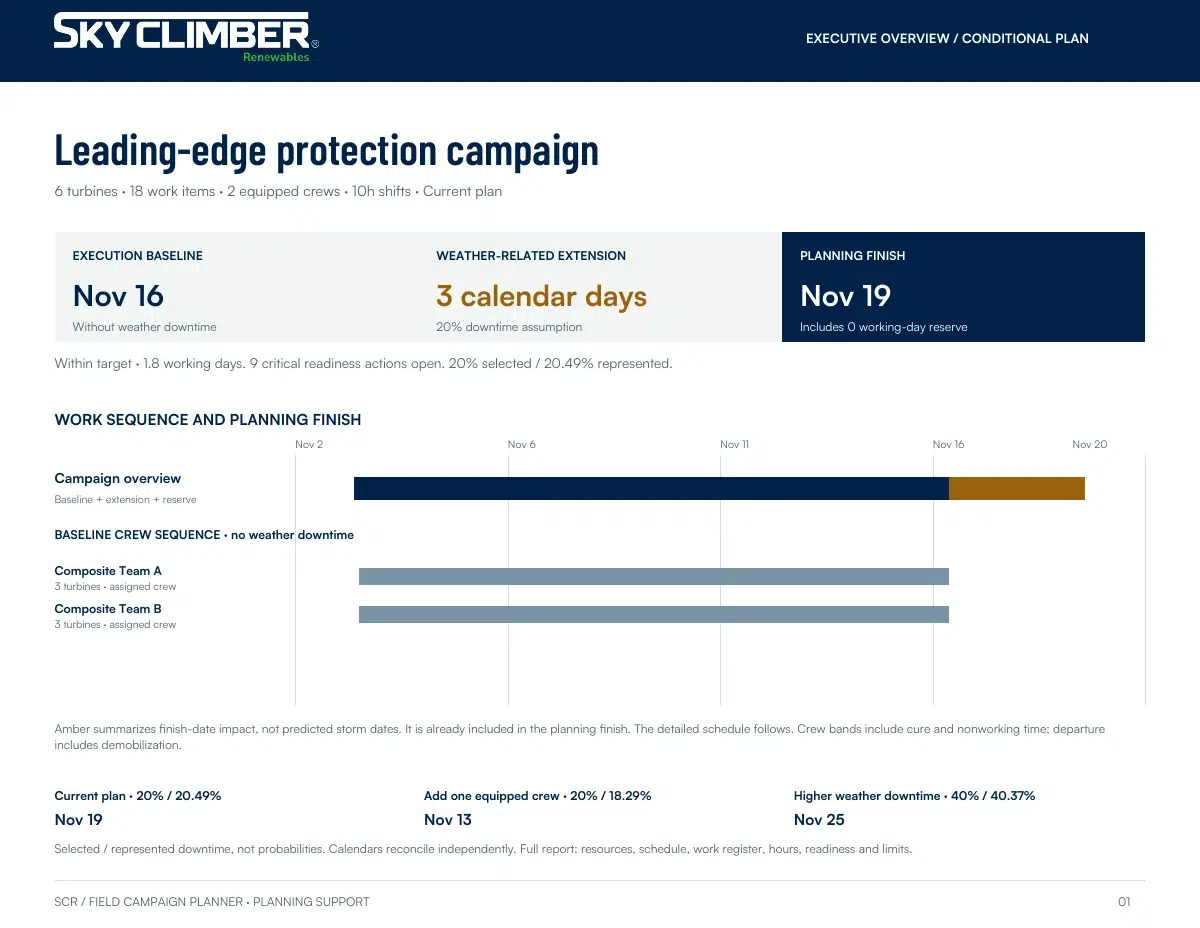
ACTUAL REPORT PREVIEW · BLADE SERVICES
Illustrative example. Your report reflects your inputs and selected scenario.
FROM PLANNING TO A USEFUL CONVERSATION

A practical starting point
for your next campaign.
Turn scope and planning assumptions into a schedule you can review with your team. Compare delivery options, identify readiness gaps and take a clear starting plan into your next project discussion.
Build a starting schedule.
Translate scope, equipped crews and working hours into a campaign sequence.
Compare delivery options.
See how another crew or different weather assumptions affect the planning finish.
Take a useful plan away.
Download a designed PDF, work-register export and readiness worksheet.
Your plan is not sent automatically. Save the report and share it with SCR separately if you choose.
BEFORE YOU START
A few useful answers.
Understand the assumptions, choose your scope and make the plan your own.
Who is this planner for?
Wind-site managers, campaign planners, service contractors and owner/OEM teams developing an initial execution plan. Use it to compare assumptions and prepare a discussion, not to authorize field work.
What can I plan?
Choose Blade Services for repeated scopes or mixed repair rosters, or Preventive Maintenance for one defined package repeated across a turbine population. See the planning limitations below for supported sizes and resource constraints.
Where do the estimates come from?
The schedule uses the task durations, crew resources and working calendar you enter. Sample task durations and weather assumptions are illustrative, not pricing or guaranteed production performance. Adjust them for your scope, equipment, site conditions and operating experience.
How is weather applied?
The selected percentage is represented as illustrative downtime in the working calendar, rather than slower task durations or a second buffer added at the end. Full and half-shift blocks can produce a represented percentage that differs slightly from your selection. The report shows both. This is a planning scenario, not a forecast.
What do I receive, and do I need an account?
Review your schedule and scenario comparisons, then download a PDF with the plan and readiness worksheet, plus CSV work-register exports. No account or email is required. Save your outputs before leaving; refreshing the page clears your inputs.
Discuss your campaign with SCR.
Your plan is not sent automatically. Save your report and share it separately if you choose.
Discuss this campaignPlanning estimates only. Results depend on your inputs and assumptions; actual conditions and completion dates may differ. This tool is not a weather forecast, engineering instruction or authorization to perform work. Validate the plan against applicable procedures, equipment limits and site requirements before execution.
Planning assumptions & limitations
Supported scope. Blade Services supports up to 500 turbines and 1,500 work items. Preventive Maintenance supports one repeated package across up to 100 turbines and six crews, subject to schedule feasibility. Mixed maintenance packages and shared specialist resources are not modeled in the maintenance workflow.
Use your operating assumptions. Sample task durations and weather assumptions are illustrative, not guaranteed production performance. Confirm the applicable scope, qualifications, procedures, equipment limits and site conditions. Readiness checklists do not certify safety or authorization to execute.
Save and share deliberately. Save your PDF and CSV before leaving; refreshing clears your plan. Using the planner does not automatically submit your planning inputs to SCR. Optional contact forms are separate, and the website privacy policy applies to website services.